 Mailheight
Features
One platform for every step of outbound.
From the first search to the booked meeting. Built for agencies, deliverability first, and running in production today.
01 · Find contacts
Find the right people in plain English.
Type who you want to reach, or paste a client brief exactly as written, and see the counts and data quality before you spend a credit.
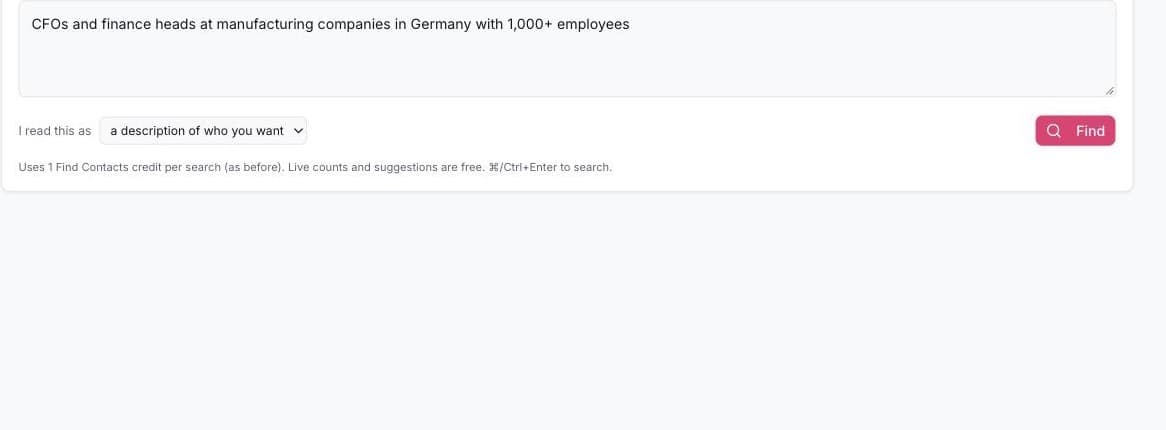
Search the way you talk
- A request like “CFOs at manufacturing companies in Germany with 1,000+ employees” becomes filters you can see and edit
- Paste a client brief as written: targets per country (“UAE 250”) with a free count for each, and exclusions such as “not USA” respected
- Save searches and run them again any time for fresh counts
Precise targeting
- People: job title, seniority, keywords and country
- Companies: industry, size and country
- Technology a company uses, or does not use
- Hiring signals: companies hiring for specific roles, with a minimum number of open jobs
- Verified emails only, with one click
Other ways to search
- Paste company websites or names, matched to the right company automatically
- Paste company and person pairs to find or complete named people
- Find lookalike companies from a single example
Quality first, volume when you need it
- See verified email, direct dial and company phone coverage before you buy
- Your own contacts and live business data together in one results table
- Take 500 today and tomorrow's batch skips everyone you already have
- Standard email finding or a full profile with LinkedIn, location, seniority and company details
- Background downloads kept for 30 days; suppressed and duplicate contacts are never charged
02 · Contacts and lists
Import without the mess. Clean before you send.
Bad addresses are caught on the way in, every contact is validated, and every import comes with a receipt.
Import without the mess
- Upload a CSV or paste from Excel or Google Sheets; columns recognised automatically
- Extra columns kept as custom fields for personalisation
- Preview exactly how data will be stored before you import
- Large files split into manageable lists automatically
- A receipt for every import: what came in, what was dropped and why
Clean data automatically
- Spam traps, role inboxes, disposable and placeholder addresses, and domains with no mail server blocked on import
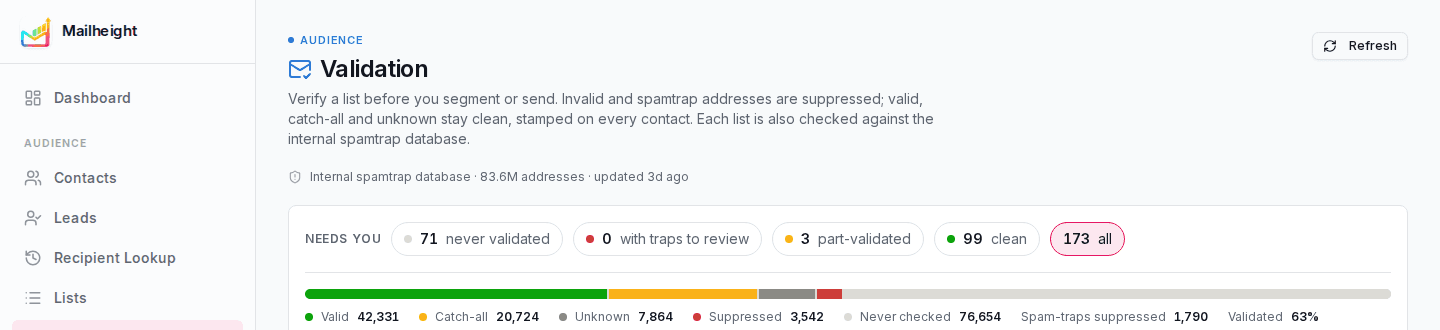
- Every list screened against 83.6M known spam traps
- Bulk validation marks every contact valid, catch-all or unknown; invalid addresses are blocked
- Contacts already validated are never charged again
- Health bars for the account and each list show what needs attention first
Organise and segment
- Lists in folders per client, labelled “Never used” or “Used 3×”, with an optional fixed sender
- Segments by any field, list or behaviour, with a live count of who can still be emailed
- Every contact shows its source and status
- Recipient Lookup: the full history of any address across every campaign
03 · AI Content Hub
Personal writing at scale. Researched, never invented.
Each prospect's website and recent dated news are read first, then every step is written around what was found and held for your approval.
Research first, then write
- A personalised subject line, email and preview text for every step
- Full sequences: one introduction plus up to seven follow-ups, each with its own purpose
- English, German, French and Spanish, each with an English copy for review
- A/B angles: two genuinely different approaches from one short brief
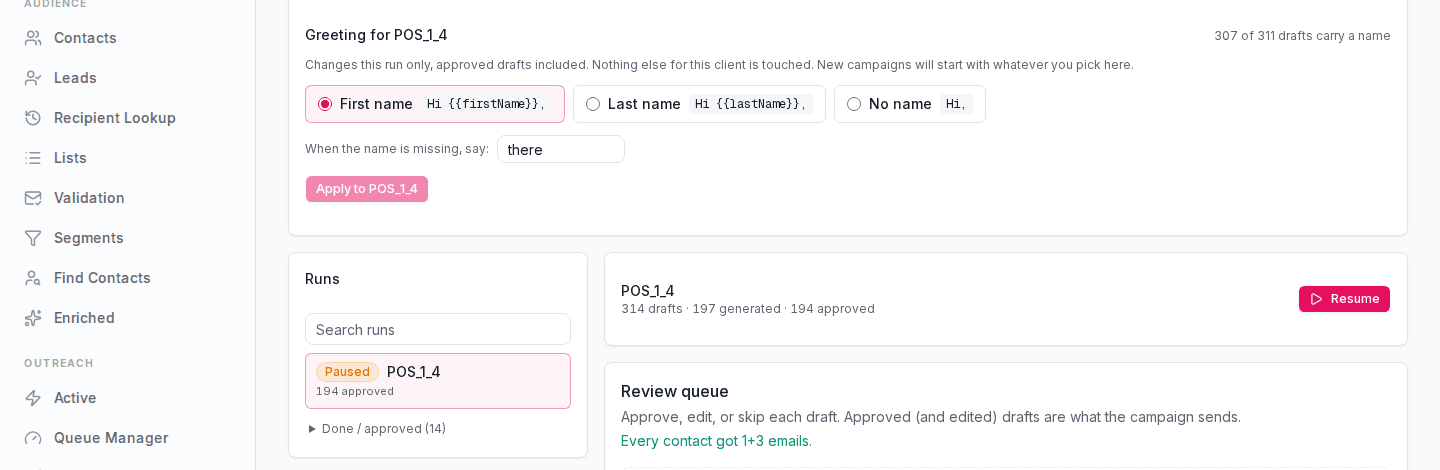
- Switch greetings between first name, last name or none after drafting, at no cost
Guardrails and review
- Brand rules per client: banned words, required tone, enforced or guidance only
- Broken or off-brand drafts blocked when written, again at approval, and re-checked daily
- Spam scoring with visible reasons and suggested fixes
- Review queue: approve, edit, skip, or approve everything that passes. Nothing sends without approval
04 · Campaigns
Every follow-up timed and controlled.
Sequences react to what each person does, go out in their business hours, and do not launch until every check has passed.
Smart sequences
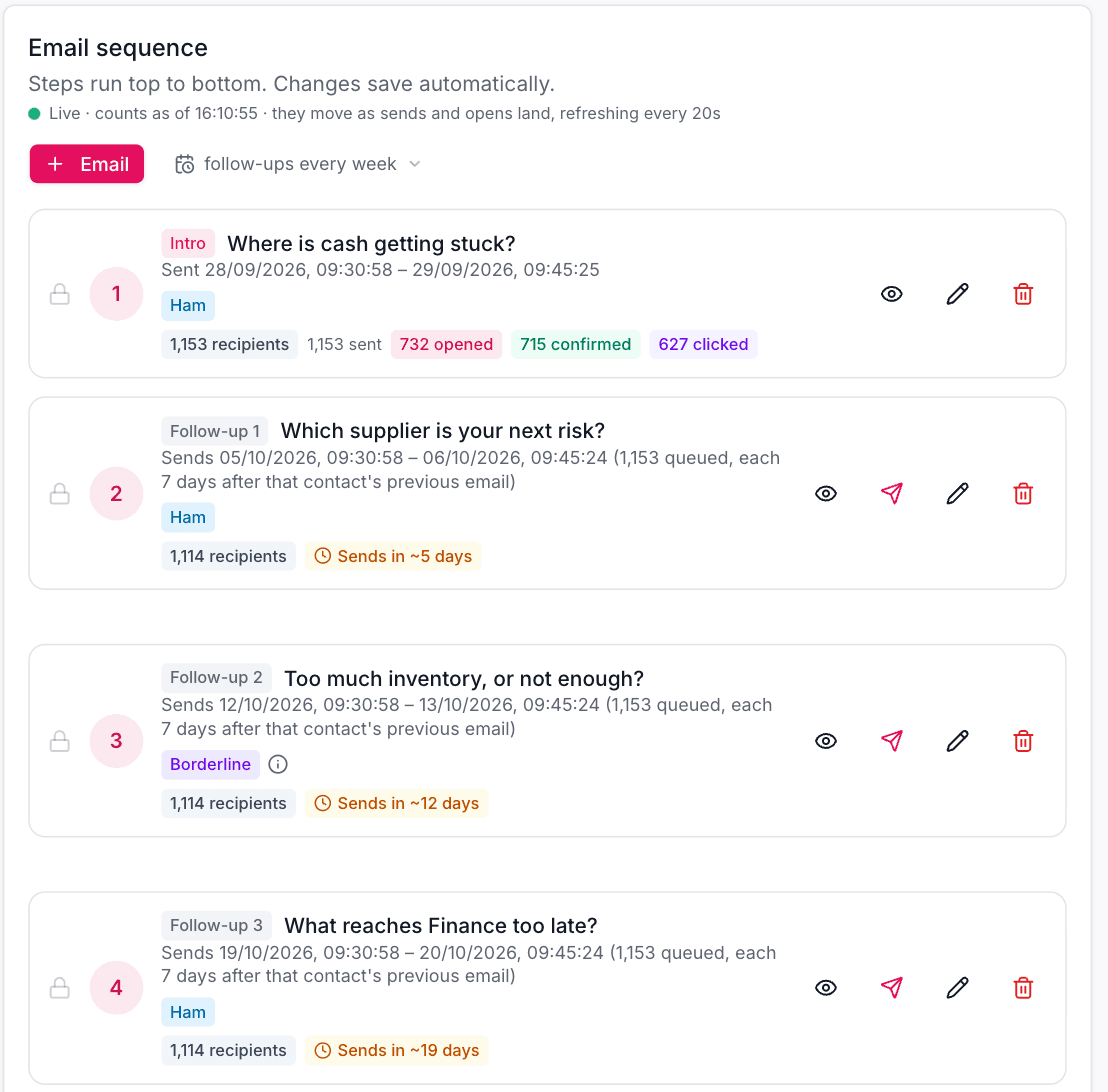
- Email and wait steps, saved automatically as you work
- Follow up always, only if opened, only if not opened, or only if clicked
- An “if opened” follow-up goes out shortly after a confirmed read
Sends at the right time
- In each recipient's local business hours, or in one campaign timezone
- Weekends skipped by default, with national holiday warnings per country
- A fixed send time per step, or a simple gap between steps
Protects your reputation
- Daily and hourly sending limits
- Sends to the same company spread out, never a burst
- Paced sending to the big inbox providers
- Never more than one email per person per campaign per day
Checks, tests and control
- Before launch: domain authentication, subjects, images, credits, and a spam score on the real emails
- Split test subject, sender or body; judge by confirmed opens, clicks or replies and roll the winner out automatically
- Active board: what is sending, what needs attention, the next send and why anything is paused
- Resume a stalled campaign without a single duplicate; tracking on or off per campaign with an EU and UK recipient count
05 · Replies and leads
Every reply handled. Every lead credited.
Replies from every sending mailbox land in one inbox, already sorted, and interested prospects become leads in one click.
One inbox for every sender
- Every reply from every mailbox in one place, including replies that landed in junk
- Threaded per person with quoted history collapsed; reply directly from Mailheight
Automatic reply handling
- Sorted as a real reply, bounce, out of office or automated message
- “Unsubscribe”, “stop” or “left the company”: opted out permanently
- A real reply stops the follow-ups at once
- Out of office, in many languages: the sequence pauses and resumes later
- Hard bounces blocked; repeated soft bounces escalated to a block
Leads pipeline
- Promote a reply to a lead in one click, credited to the campaign that earned it
- Stages from Replied and Qualifying through Meeting, Opportunity, Won or Lost
- Company profile and location added automatically; signature job-title changes flagged with a one-click fix
- Lead follow-up: requirement, pain point, decision maker, timeline, budget fit and next action, with a qualification score
- Find similar prospects: turn one good lead into many more
06 · Insights
Numbers you can show a client.
Scanner opens and bot clicks are filtered out, so every number in your reports is a real person.
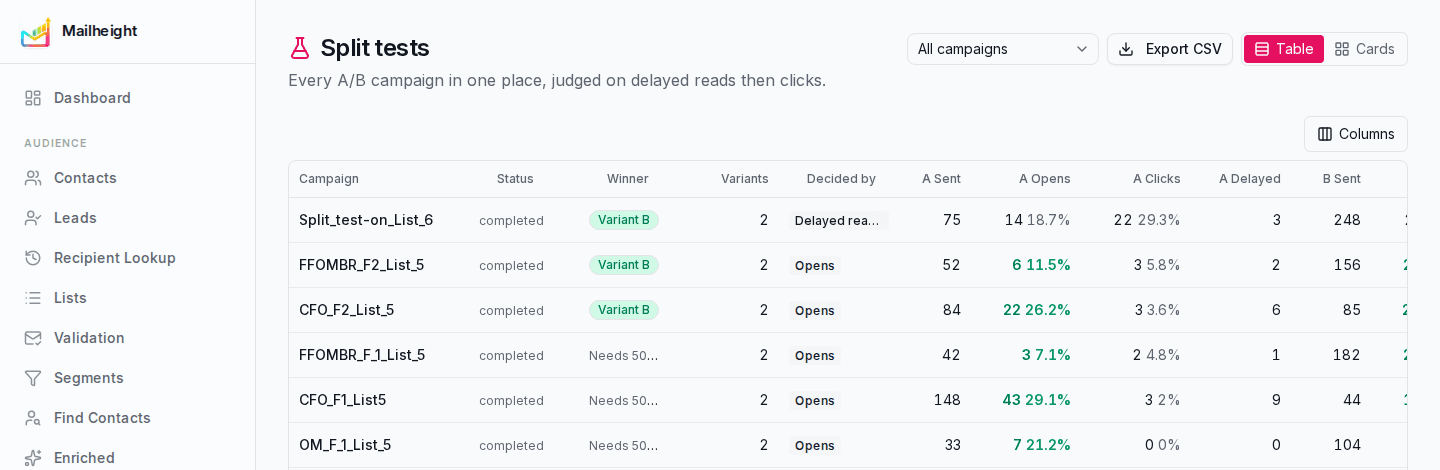
Numbers you can trust
- Confirmed opens separate real reads from security scanners and inbox pre-loading
- Link-scanner clicks filtered out; unsubscribe and footer links never count as clicks
- Rates per person reached as well as per email
Find what works
- Best performers ranked with a confidence adjustment
- Compare campaigns side by side and see split-test winners across every campaign
- Best day and hour to send; export engagement per recipient
Audience insight and intent
- How much of each list matches the client's ideal buyer, with the people behind every number
- Hot or Warm intent for every contact, from real engagement
- A daily scan for real, dated events at target companies that fit what the client sells
- Turn signals into a follow-up campaign in one click
07 · Deliverability
Your domain, protected every day.
Dedicated IPs for every client, sending from your own domain, and the checks that stop a domain from burning in the first place.
Infrastructure
- Dedicated IPs for every client: no shared pools, no rotating domains or mailboxes
- Send from the domain your brand owns, so reputation builds instead of resetting
- Daily, AI-varied warm-up from every sender
Monitoring
- Sending-domain authentication checks: SPF, DKIM and DMARC
- Daily blocklist monitoring per sending domain, with history, not just a status
- Sender health tracking, including bounce rate
- Spam traps checked before anything sends: 83.6M known traps
Compliance built in
- Signed one-click unsubscribe and a recipient-facing unsubscribe page
- A data-request (erasure) link for privacy requests
- A required postal-address footer
- Unsubscribes, hard bounces and spam traps blocked across your whole account
08 · Agencies and teams
Every client, separate.
Many clients, many team members and separate credits for each client, all set up from one place.
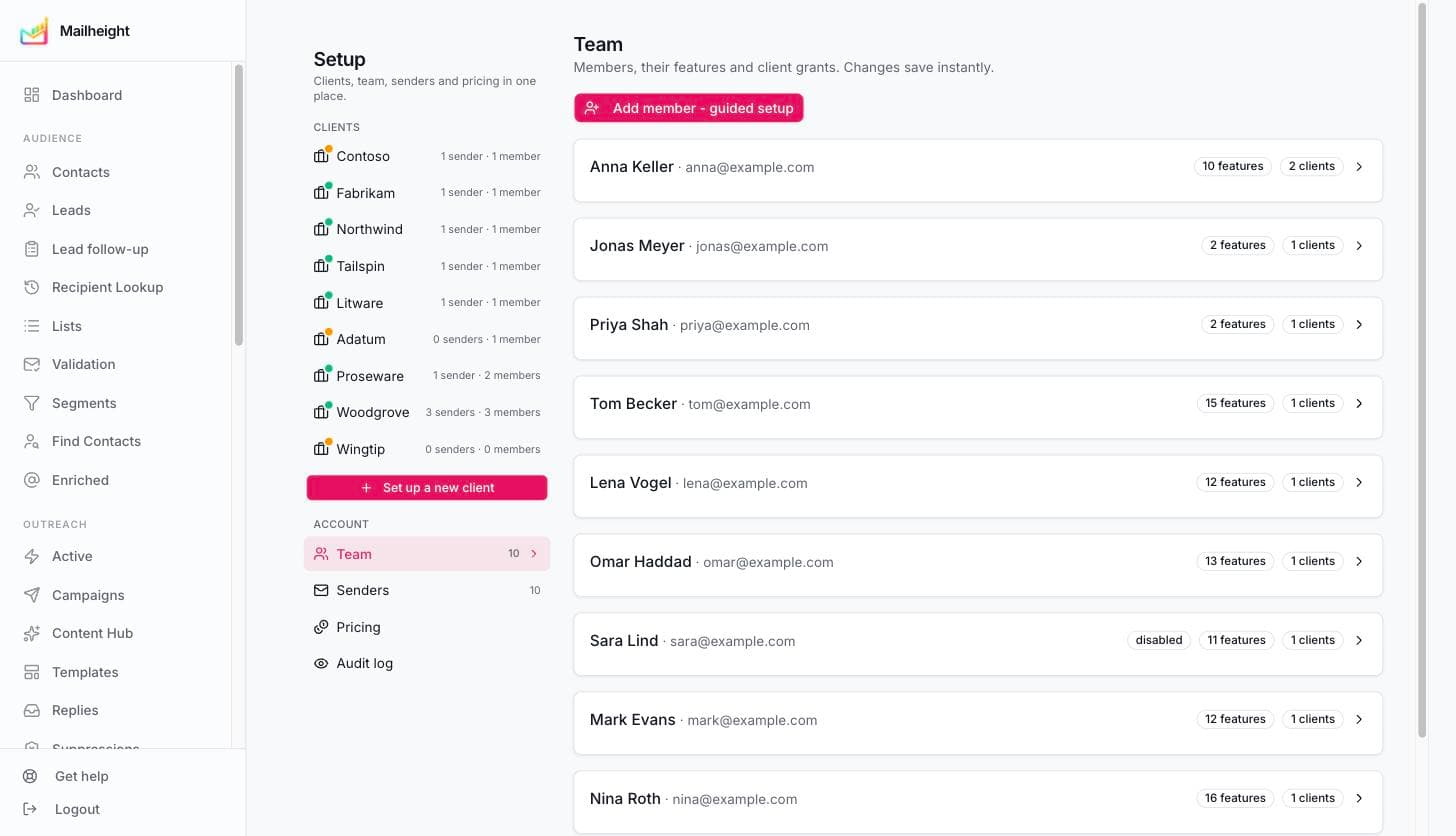
Guided client setup
- Client, team, credits, sender, then a sending-domain check, with a checklist so nothing is missed
Team access
- Access presets: Operator, Sales, Reporting only, Data only, or Everything; or pick individual features
- Each team member sees only the clients they are assigned
- A sales view focused on replies and leads
Rules and reporting per client
- Sending limits, follow-up depth, brand guardrails, signals on or off, and a fixed sender
- A live, password-protected report link per client, with per-campaign results and best send times
- You are notified when a client opens their report
- Weekly contacts added and emails sent for every client
09 · Credits and billing
Pay for what you use. See the cost first.
Credits per service, the cost shown before every paid action, and duplicates never charged.
Credits
- Separate credits for finding contacts, validation, spam-trap checks, AI writing and research, list import, sending and intent signals
- Every paid action shows its cost before it runs
- A credit planner: how far will my credits go, with a suggested top-up
Plans and margin
- Monthly plans (Start, Grow, Advance) plus top-ups whenever you need them
- Agencies can set a different price for each client
- Low-balance warnings based on days of credit left, plus renewal reminders
- A full usage history by day, service and reason, and a list of past purchases
10 · Security and support
Safe by default. Help when you need it.
Client data kept apart, sensitive actions protected and logged, and support built into the product.
Security
- Each client's data kept separate; team members only see what they are given
- Repeated failed logins blocked, with a clear reason on the login screen
- An audit log of logins and sensitive actions, with alerts on unusual export activity
- An admin code protects destructive actions
Support
- A built-in help desk: every ticket includes the page you were on and any error details
- An email when support replies
- A live system status page
See it working on your own data.
A 30 minute call, your lists, your domain, your questions.
Book a demo